
Well this tutorial is not about Adsense for Feeds or
But don't worry, you still can earn money from your RSS Feeds. There's an alternative ways to add Adsense in your RSS Feeds, BUT remember this only works on Blogger blogs.
See example below:-
1) - Get new Ads for your RSS Feeds
Simple just login to your Google account and create new ads for your RSS. After you have get the code. Proceed to step 2.
2) - Setting up your new ads for RSS in Blogger
Login to your blogger dashboard, go to Settings - Site Feed
Go to Allow Blog Feeds and select Full to syndicate the full content of your post. If select Short, you won't able to display your Adsense.
3) - Adding your new ads code for RSS in Blogger
Make sure still in Site Feed Tab, and find Post Feed Footer. Paste your new Adsense code in and Save Settings.
Just wait for a few minutes before your ads can be display in your RSS. I hope this tutorial will help you earn more money in Adsense
Don't forget to Subscribe to The-Online-Quest via RSS or you can receive daily updates via Email.
Signing off..
11.16.2008
How to add Google Adsense in RSS Feeds for Blogger
7.13.2008
Remove all your Adsense referral code from your sites/blogs
Quote
"We're constantly looking for ways to improve AdSense by developing and supporting features which drive the best monetization results for our publishers. Sometimes, this requires retiring existing features so we can focus our efforts on the ones that will be most effective in the long term. For this reason, we will be retiring the AdSense Referrals program during the last week of August. We appreciate your patience during this transition and here are some alternative options to consider:"
Visit http://adsense.blogspot.com to read more.
7.06.2008
Adsense Tips To Earn More

Google Adsense is great PPC or Pay Per Click Program that any web publisher can use to earn huge money from their website. If you wish to earn money from blogging, you can register adsense here. With these tips below, it helps me earn a lot more. I've already reach my minimum payout, so i will be receiving my first check. I will post about my first earning. So stay tune and subscribe to RSS or email and don't miss anything here.
Check you Keyword density
Check the keyword density of your page, this will help you forecasting of ads that will be displaying on your pages. You can also adjust you pages to target particular type of ads.
Update you page to target towards some ads
You can also update you page content to target some keywords.
Build theme based content for better result
Make the pages of the related topic, you can use the keyword suggestion tools to achieve this. For example, if your blogs are about health, your blog themes should be health related and health related contents.
Increase you web site page count
You should write one or more pages per day to increase number of pages on you website. When you create more quality content you will start getting more visits to you web site and your income will keep on increasing.
Use the best adsense ads format on your web site
Research on the ads format and then display the best ads on your pages. You can also read about it here.
Use the right color combination for your ads
Use the ads color matching with your page theme.
Layout Optimization Tips
Optimize your layout to increase more. Read here.
Another 5 simple tips to increase more
These 5 simple tips will definitely boost your income. Read here.
Identify LCPC/MFA Junk Ads
If your Adsense earning per day drop suddenly while the site traffic remains stable or even on the uptrend, most likely there are too many junk ads appear on your account! Read here how to Identify them and remove them.
I hope some of these tips will help you guys. Don't miss any updates here and subscribe. Have a nice day!
5.31.2008
How To Identify LCPC/MFA Junk Ads
 If your Adsense earning per day drop suddenly while the site traffic remains stable or even on the uptrend, most likely there are too many junk ads appear on your account!
Junk ads used to be low-cost-per-click (
Please don't click your own ads to preview the link, You will be ban from adsense if you do this.
You read more about Top 10 AdSense Don'ts
So how do i preview the link by not clicking them?
You need to install adsense preview tool on your web browsers.
For Firefox click here
For IE click here
After you have install them, you can preview your ads link.
After you get the link How To Identify LCPC/MFA Ads?
Adsense junk ads usually lead the readers to a website that sharing one or more of these characteristics:
1. With a zero Google Pagerank
2. With a really simple and plain web template / theme design - the web design looks like a homework of novice who have just completed the first day of web development course.
3. There is no About or Contact page that can convince readers about the site history or trustworthy value.
4. Redirect readers to another URL that is different from the URL shown in the ads.
5. The same web theme / template used among few tens of URLs that own by the same entity!
6. Made-for-ads (MFA) link farm - full of ads and links that point visitors to other less popular websites.
7. URL with misspell word (e.g affiliate as affilate, junction as junktion, etc), long domain name and/or with dash symbol, etc.
8. Using free hosting site example Blogger or Wordpress
Other than these manual ways to identify LCPC junk ads, there is a web service that used to automatically and directly update the list of junk ads in your Adsense account!
Once the LCPC junks are identified, use the Adsense Competitive Ad Filter to blacklist or block them from appearing!
How to add links to Competitive Ad Filter?
Login to your adsense account, click adsense Tab then Competitive Ad Filter Tab.
Paste your junk link and save changes.
Good luck on your adsense earnings!!
5.24.2008
Optimize Adsense ads on your Blog to Increase Your Profits
Blend ads into your blog To increase the likelihood that your readers will see and click on your ads, blend your ad units into the background of your blog. Choose a bold color for the ad title to help draw attention to your ads, then make sure that the background and borders of your ads are the same color as the background of the area where the ad is placed. Experiment with multiple ad formats and locations In general, wider ad formats tend to be more reader-friendly. Placing an ad unit after the first post will likely catch your readers' attention. Take a look at our sample implementations to get some ideas. Also, consider placing a Skyscraper (120x600) or vertical link unit on the right side of your blog. If you're using Blogger, you can find instructions on placing AdSense code in your blog's sidebar. Offer readers more options with search and referrals To make sure you're earning the most revenue possible with AdSense, go beyond just ads to use AdSense for search and referrals. You can increase your earnings, provide readers with valuable information, and take advantage of flexible formats. Improve ad targeting With section targeting, you can target an ad unit to a specific section of your blog, as well as block out irrelevant sections like navigational links. We recommend that only those familiar with HTML attempt to implement section targeting. Tip for generating more traffic to your blog: If you're a Blogger user, activate this setting to notify Weblogs.com, a blog update notification service, whenever you have updated your blog. That means your blog will be included in various "recently updated" lists on the web as well as other blog-related services. When working with a blog, you're facing some interesting ad implementation challenges: a predetermined page format, highly targeted content, and regular visitors, among other things. To make the most of your readership and content, here are a few suggestions: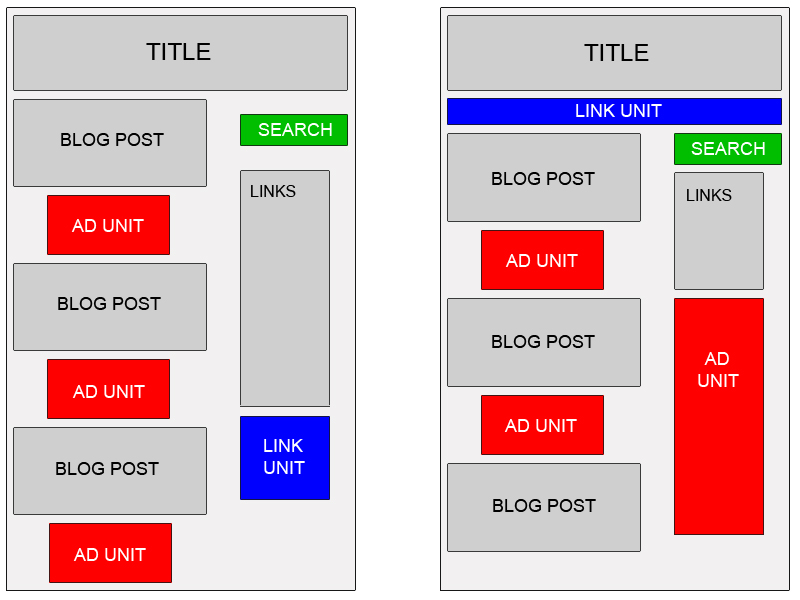
5.22.2008
Top 10 AdSense Don'ts
 Want to make money with
1. Commit Google Don'ts
The first thing to avoid is any of the Google Don'ts. Cloaking, keyword stuffing, and title stacking are all ways to get banned from Google searches. They're also ways to get banned from AdSense.
When you place AdSense ads on your site, your site is far more visible to Google and it's much more likely that your rule breaking will be caught.
2. Click on Your Own Ads
No matter how tempting, never ever click on your own ads. This is probably the easiest way to get your site suspended or banned. It's a form of click fraud, and Google is very good at catching this, even if you think you're hiding your tracks.
Don't let anyone who uses any computer in your home click on your ads, either. Make sure your significant others and children are aware of the rules, or you could jeopardize your standing with Google.
3. Hide Your Ads
It might be tempting to hide your ads by making them the same color as your background or camouflaging them on areas with busy background images. You do still get paid for pageviews, so invisible ads would still pay, right? Don't even try it. This violates Google's Terms of Service, and it's easy to get caught.
Don't stuff your ads far below the rest of the content, either. Clicks pay better than pageviews, so it's to your advantage to have your ads prominent. Try to make the ads look like they belong on your page.
4. Beg for Clicks
Don't hold ad-click contests, beg, or even give big hints that people should click on your ads. They can ban you if they catch you begging for clicks anywhere on the Web, including pages that are totally unrelated to your AdSense pages.
Google also forbids labeling your ads with language stronger than "sponsored links." This is really for everyone's benefit. Pages that beg for clicks are usually not great reads, and pity clicks don't help the advertisers.
Note: It's fine to have contests on your Web site that aren't related to ad clicking or other rule breaking, such as "best photo" contests
5. Alter the Code
AdSense generates javascript code that you can copy-and-paste directly into the HTML of your Web page. If you need to change the color or size of your ads, generate new code from AdSense. Don't make changes to the code from your Web page editing program or tweak it by hand.
If you put AdSense in Blogger, Google will generate the code for you from within Blogger.
6. Use Robots to Click on Your Site
Never use any sort of automated tool to inflate your page views or click on your ads. This is click fraud of the highest order, and Google is very sophisticated at catching this. This is a trick that can easily get you banned.
Likewise, don't use human-powered schemes to pay for clicks, either. No trading clicks with other AdSense users, and no pay-for-clicking schemes. If advertisers wanted to pay people for clicking, they would have signed up for it themselves.
7. Tell People How Much You Earn Per Click
Google is very picky about how much you disclose about how AdSense works. They don't let you tell people how much you were paid per keyword, because this could jeopardize revenue from AdWords advertisers. Beware of anyone who offers to sell you this information.
8. Make Pages Specifically to Display Ads
Google says you can't make pages simply to hang ads, "whether or not the page content is relevant." Many Web sites, including About.com, make money from ads. Google itself makes most of its money from advertising. What makes the difference between ad sponsored content and content for the sake of ads?
When you develop your site, your first thought should be about creating content, not ads. Avoid writing empty sentences for the sake of generating keywords, and avoid lengthy copy-and-pastes just to make more pages. Every page you publish should have a content-driven purpose.
9. Make Content About Taboo Topics
Google has a strict list of content standards, and they don't accept AdSense on pages that are violating them. These include, among other things, sites that promote or sell:
This is a silly rule to violate, because AdSense is keyword generated, so it's amazingly easy for you to get caught. If you do have content that violates these rules, such as a beer-making supply store, they may be legitimate sites, but AdSense is not for you.
10. Cheat in Any Other Way
This isn't by any means a comprehensive list.
I'm sure there are many ways to game the system that Google hasn't found out about... yet. There always are. AdSense is constantly changing to find new ways to detect click fraud, and eventually you will be caught.
The best way to generate income through AdSense is to create good content that is well optimized for search engines and to promote your site through legitimate channels.
That sounds like a lot of work, because it is a lot of work. However, it's a strategy that won't get you banned.
Related articles :
5.18.2008
Predict Your Adsense Earnings With Adsense Calculator
The AdSense Calculator helps Google AdSense affiliates understand what affects their earnings by letting them experiment with values.
It also allows Google AdSense users to take their current statistics and calculate how much they can expect to earn daily, monthly and yearly. Site owners who are considering implementing AdSense on their site(s) can also use this tool to estimate what results they are likely to see.
Daily Page Impressions
Daily page impressions indicate how many times ads are shown per page. You can use your average, anticipated, or current daily page impressions for this
Click Through Rate (CTR)
This figure represents how many visitors actually click your advertisements. You can find this easily on your Google AdSense stats page labeled "CTR." The average rate is estimated to be about 1.5%.
Cost Per Click (CPC)
Your CPC is the average of how much you get paid for someone clicking one of your advertisements. To find your average CPC take you’re the amount of money you have earned from AdSense (daily, monthly, or all time) and divide it by your total clicks (daily, monthly, or all time).
Add the Adsense Calculator to your web site FREE!
Related articles :
4.30.2008
Increase Adsense CTR With Background Images
 AdSense background images are the hottest new way to boost your AdSense CTR, and although many believe that it violates the AdSense TOS they are dead wrong.
It has been confirmed by Google to be completely safe and compliant with the AdSense TOS. The only pictures they said would violate this is ones that point to the ads or ask for them to be clicked. You will not find any of that trash here though so don't worry.
The code for inserting a background image for your Adsense ads is quite simple. I did not change any of the Adsense ad code.May not place misleading labels above Google ad units - for instance, ads may be labeled "Sponsored Links" but not "Favorite Sites"
I had also written to Adsense support asking them whether these images were okay.
Here's Google's response:
"The background images used on your site would be considered a violation of our program policies because it could draw unnatural attention to your ads.
Publishers are not permitted to encourage users to click on Google ads or bring excessive attention to ad units. For example, you may not use symbols or misleading images that direct attention to the ads on their sites.
We ask that you please restore the ads to their intended settings. We ask that publishers copy and display the ad code exactly as it appears in the 'Your AdSense code' box of your AdSense account without any modifications.
Please keep in mind that modifying the ad code or drawing unnatural attention to the ads are against our program policies."
Written by : SatishTalim
Finally, can we use Adsense background images? Is this against the TOS?
Here's Google's answer - "Background images are fine so long as the ads are clearly portrayed as ads, and clearly distinguished from the content."
1. You may not change the ad code itself. The wording in the policies is:
Any AdSense ad code, search box code, or referral code must be pasted directly into Web pages without modification. AdSense participants are not allowed to alter any portion of the ad code or change the layout, behavior, targeting, or delivery of ads for any reason.
2. You can not be seen to be drawing undue attention to ads, either with text or images.
Visit problogger to read more about this.
Google AdSense Program Policies
Encouraging clicks
In order to ensure a good experience for users and advertisers, publishers may not request that users click the ads on their sites or rely on deceptive implementation methods to obtain clicks. Publishers participating in the AdSense program:
Read More!
Others, meanwhile, will tell you that what’s prohibited is over-optimizing your images such that they already represent the context of your text ads (e.g., if your site is about fruits, and most of your AdSense ads are about fruits, you put up images of fruits alongside the ads; see image below, which was used by Inside AdSense as an example).
Google, itself does not explicitly say you cannot insert images, but only says that associated images should not be used.
So are you satisfied? You are not against Google adsense TOS if you do it right.
I am going to teach you how to put background images with adsense ads and increase your CTR. You can either create your own background image or you can get it free at http://adclustr.com.
Is adclustr legal?
We have contacted Google multiple times and they have continually said that if the backgrounds don’t bring undue attention to your ads, then you are OK. Of course, if you have any concerns, or if you are unsure of the implementation you have, please contact Google directly.
Simply and to the point, Google insists that background images are fine so long as the ads are clearly portrayed as ads, and clearly distinguished from the content.
Ok, after you have created your own images or downloaded from http://adclustr.com, the next step is how do to put the background image in adsense ads in the example below? -:

Just copy all the code and change some values in red :<table align="center" width="INSERT IMAGE WIDTH" height="INSERT IMAGE HEIGHT" border="0" background="INSERT IMAGE URL">
<tr><td width="INSERT IMAGE WIDTH" height="INSERT IMAGE HEIGHT">
<div align="center">
YOUR
ADSENSE
CODE
HERE
</div></td></tr>
</table>
Enjoy with your new adsense ads and increase you revenue!
Related articles :
4.17.2008
Top 10 Google AdSense Mistakes
Things you should not do with your Google adsense.
There is no question that you can make some good money with Google AdSense, but you are setting yourself up for disaster if you make any of these Top 10 mistakes!
1. Do not use fake information when opening your Google AdSense account.
Google says that is a no-no and they will cut your account off and keep all the money you may have earned. Besides, trying to hide your identity can cause serious problems with the I.R.S. or whoever your tax authority is.
2. Do not hack or modify Google AdSense code other than to change the parameters that Google authorizes you to change.
Any attempt to bypass Google's built-in algorithms not only poses a danger to the integrity of the network, but it threatens the financial model under which Google operates You are not dealing with some Mom-and-Pop company here, and Google has the legal muscle and deep enough pockets to drag you through every court in the land if you damage their business with your hacking antics.
3. Keep AdSense ads off your registration, confirmation, and all "thank you" pages.
Do not ask me why you cannot put your ads there. It makes sense to me that those would be wonderful locations. Google thinks otherwise, however, and doing so is a hanging offense according to their Terms of Service.
4. Do not display AdSense ads and a competitor's ads (like Overture's) on the same page at the same time.
That just makes plain good sense. Google does not demand 100% SITE loyalty from you, but they do insist that their own ads not be cluttered up by offerings from their competitors.
5. Don't "beg for clicks" or provide any incentive for clicking on your Google AdSense ads.
This is a biggie and you see this rule violated all the time. Any of the "get paid to do stuff" sites that put Google ads in the member's control panels are walking the plank and they do not even realize it. Even those sites with the polite little messages asking you to "help keep my site running by clicking on our sponsor's ads" are asking to be cut off if those happen to be Google ads.
6. Never click on the ads running on your own site, even if you are genuinely interested in the product or service and are thinking of buying it!
Nothing screams FRAUD louder than a webmaster running up his or her own click counts by happily clicking on ads from their own site. The Google Gods can track this activity and it will not be long until you find yourself getting a goodbye note from their fraud team.
7. No misleading labeling
Google is very specific about what text can be placed around their ads. Their Terms of Service state: "Publishers may not label the ads with text other than 'sponsored links' or 'advertisements.' This includes any text directly above our ads that could be confused with, or attempt to be associated with Google ads."
This is to keep visitors from becoming confused and barking up Google's tree, when they clicked on an ad that led to a porn site instead of the recipe site they were expecting to visit.
8. Avoid keyword spamming and other divisive tricks
You may be tempted to buy one of those "generates thousands of key-word rich pages in seconds" programs that are so popular these days but I will tell you this: Their days are numbered. Google is wise to such shenanigans and they will be hot on your trail. Other prohibited gimmicks include:
- "Sneaky" page redirects that send a visitor off to a different site then they were expecting to visit.
- Multiple sites, domains, pages, etc., which have duplicate content.
- Hidden text or links of any type.
- Excessive outbound links on any page. Google recommends no more than 100. I would keep it way below that.
- And here is a nugget of wisdom straight from Google's mouth: "Do not participate in link schemes designed to increase your site's ranking or PageRank. In particular, avoid links to web spammers or "bad neighborhoods" on the web as your website may be affected adversely by those links.
9. Don't advertise anything on Google's prohibited items list.
It's a lot shorter lists than PayPal's or eBay's, but it includes a lot of the same stuff like hacking/cracking content, porn, illegal drugs, gambling sites, beer or hard alcohol (I guess wine is OK), weapons, and the other usual stuff.
10. And the 10th dumbest thing NOT to do with Google AdSense is to let the other nine things stop you from running an honest site that's designed to make the most out of this very profitable opportunity that Google offers!
Related articles :
3.24.2008
AdSense Code in Blogger Post Body
One of the known tips for improving the performance of your Google AdSense ads is knowing where to place the ads. In this guide, we shall discuss the modification you can make to your Blog template to have your Google AdSense ads appear between your post title and post body, or between your post body and post footer. Also, we shall have the AdSense ads appear on every individual post.
Choosing a best placement for your AdSense ads will attract more attention; attention leads to clicks; and clicks bring you AdSense revenue. Easier said. While people may have theories on where the ideal AdSense spot ought to be, there is really no standard answer because it depends very much on your Blog's layout, contents, theme, etc. If you have been following the changes made to our Blog, you would agree that we are no guru at this. We had merely placed the ads where they fit aesthetically and not where they will get the most attention. Nevertheless, if you would accept our two cents' worth of opinion, try to put yourself in the minds of your readers. Ask questions like why readers visit your Blog, which section of the Blog are they most interested in, and whether placing an ad at a particular area will distract, annoy or please them.
Many people believe that having AdSense ads just before or after the Blog posts will best optimize their performance. For the purposes of this article and to give you an idea how it would look, we have inserted the AdSense code into our template to have the ads appear immediately below the article and before the post footer. If you think you would like to do the same for your Blog, the following are the steps you should take.
If you merely want an Ad to appear after every post or every few posts, use this Google feature instead. Go to Template -> Page Elements and you see in your layout the heading “Blog Posts”. Click the “Edit” link at the bottom right corner. You will see this screen.
We assume you have a Google AdSense account. If you don't, you can create one using the same login through your Google account. You will be assigned a Publisher identity number which shall appear in all your AdSense codes.
Tick the “Show Ads Between Posts.” You can select whether to show ads after every post or after several posts. In accordance with AdSense TOC, a maximum of 3 Ads will be displayed. Choose the ad format and color scheme. Save the changes and refresh your Blog to see the Ads.
While using this Blogger feature is simple and easy, you may want more control over the position of the Ads. For example, you may want it between the title and posts rather than after the posts. The following guide will show you how you can do that.
Log in to your Google AdSense account.
Go to AdSense Setup -> Products and choose “AdSense for Content”.
Next, select “Ad unit” and follow their instructions on picking the size of ad, color combination, and so on, right till the end when they automatically generate a HTML code for . Copy this code and paste it into Microsoft Notepad. (If you are a WinXP user, click the Start button at the bottom left corner of your screen. Under All Programs -> Accessories, you should see the MS Notepad icon.)
This heading may sound misleading. We are not at all altering the code but converting some of the characters to character entities. We have to parse the AdSense code so that it can be included into your Blog template. This is not against AdSense rules because after the code is inserted into the template, when you view the source code of the template, you should see the exact same AdSense code that Google has generated for you. Indeed, if it is anything different, it means that you have not parsed it correctly and should review the code again. Parsing the code essentially involves replacing the following HTML characters, Go here to parse your HTML code.
After parsing your code, your final Google AdSense Code should look something like this:-
google_ad_client = "pub-0000000000000000";
google_ad_width = 336;
google_ad_height = 280;
google_ad_format = "336x280_as&quot;;
google_ad_type = "text";
google_ad_channel = "";
google_color_border = "FFFFFF";
google_color_bg = "FFFFFF";
google_color_link = "000000";
google_color_text = "000000";
google_color_url = "000000";
//--></script>
<script type="text/javascript"
src="http://pagead2.googlesyndication.com/pagead/show_ads.js">
</script>
Login to your Dashboard. Go to Template -> Edit HTML and click the box next to “Expand Widget Templates”.
Now search for post.body through your browser's search function (Ctrl+F for Firefox and IE). You should see these lines:-
<div class='post-body'>
<p><data:post.body/></p>
<div style='clear: both;'/> <!-- clear for photos floats -->
</div>
If you want the AdSense ads to appear between the post title and post body, add the following code above the orange lines. If you want the AdSense ads to appear immediately after every individual post, add the following code below the orange lines. The code to add is:-
<div style='float:left;'>
AdSense Code
</div>
The AdSense Code is the one you have parsed. Do NOT save the template, but click the Preview button to see if you like the placement of the AdSense ads.
Do you want to have the AdSense code on the left of your text as shown in this screenshot?
Choose the smallest AdSense format like 125x125. Insert the AdSense code here:-
<div class='post-header-line-1'/>
<div style='float:left;'>
AdSense Code
</div>
<div class='post-body'>
<p><data:post.body/></p>
<div style='clear: both;'/> <!-- clear for photos floats -->
</div>
If you want the Ads on the right of the text, like this:-
Insert the code as follows:-
<div class='post-header-line-1'/>
<div style='float:right;'>
AdSense Code
</div>
<div class='post-body'>
<p><data:post.body/></p>
<div style='clear: both;'/> <!-- clear for photos floats -->
</div>
If you want your Ads in the middle of the post, click here.
<div style='float:left; margin-left:30px'>
AdSense Code
</div>
Should you want to align the AdSense ad to your text, you can specify a margin or padding around the entire AdSense code. The code you can use is:-
<div style='float:left; margin:5px 10px 15px 20px'>
AdSense Code
</div>
The first number 5px is for the top margin, 10px is for the right margin, 15px for the bottom margin, and 20px for the left margin. You should of course change these values to suit your template.
Preview the template and if you are satisfied, save the template and refresh your Blog to see the new positions of your AdSense ads.
Article Taken From http://tips-for-new-bloggers.blogspot.com
Related articles :
3.22.2008
5 Simple Tips To Increase Adsense Income
Adsense is probably the most popular PPC (Pay-Per-Click) advertising available to blogs. More blogs use Adsense than proper punctuation!
I read a lot of other blogs, forums, and articles about bloggers that simply hate Adsense. Why? BECAUSE THEY DON’T KNOW HOW TO USE IT EFFECTIVELY! They trash Adsense because of their lack of success (lack of research would be a better phrase)… even though it generates TENS OF THOUSANDS OF DOLLARS monthly to those that know how to use it correctly.
Adsense 101 is out the door. Let’s really learn how to make some money with Adsense!
1. Learn to blend your ads.
Learn to use colors effectively. The idea is to make the ads appear to be a natural part of your site. Don’t be the guy/girl that uses the lime green text on an orange background because he thinks that it “catches the eye”. It Does! It catches the eye long enough to feel nausea coming on.
Never use the “border” option! If you use a border, are you really blending your ads? It’s kind of like building a prison for your ads using a 2px line as bars. Using a banner just screams “Here are my ads. Don’t look at them!”
Don’t ever segregate ads. Don’t put them in their own section of the page. Don’t have 9 affiliate buttons followed by an Adsense banner. How effective is it for advertising if you throw all of your ads in one section of your sidebar? Why have them at all? This advertising strategy (or lack thereof) causes what’s referred to as “link-blindness”. If people can easily spot your ads as soon as they find your site, they learn to avoid them. And never… ever… put them all by themselves at the bottom of the page. FACT: Most readers never make it to the bottom of your page!
2. Put your ads in high profile areas.
Use the Google “heatmap” (pictured below) to help you determine where the best spots are to place Adsense code. The best area is right above content. The orange areas are hot zones, the yellow is mild, and the white is ice cold. This will vary blog-by-blog but it’s a good general
indication of what works.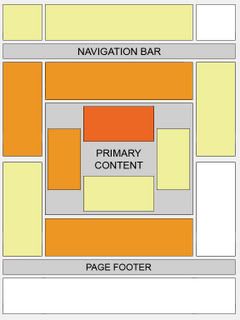
3.Track your ads performance.
A lot of people either forget about this one, or don’t realize it exists. You can track your ads performance by creating a channel for it. If you need a tutorial on how to create an Adsense channel, check out this video at Tubetorial.Com for more info.
I have channels for every different location, style, and color type ad that I have experimented with. For example, I can check right now and see what is more effective, a 160×600 sidebar banner, or a 125×125 button. You need to know this stuff!
4. Use the competitive ad filter.
Did you know that some Adsense clicks are worth as little as $0.01? Use the competitive ad filter to stop this!
The competitive ad filter was created to target spam advertisers and MFA (made for adsense) sites. You have all seen this, I guarantee it. They are the sites that you visit on accident when looking for another site. They might look like a search engine with some ads all around about a specific subject such as baseball, blogging, vacationing, jobs, etc. These are all MFA sites. They bid low and get clicks to their site for as little as a penny!
By using the filter, you can block these sites from advertising on your blog. In your Adsense control pannel simply click on the “Competitive Ad Filter” tab and enter the URL you wish to block. It’s that easy. Most of the time you’ll be able to tell it’s a MFA site by the content in the ad. If it seems like a list of some sort, more often than not, it’s an MFA site.
5. Use section targeting.
This is one that I didn’t even know existed until a few days ago. Adsense targets keywords in your text and matches them with an ad. For example, you may notice if you blog about golf, you’ll have golf related ads. The key to getting targeted ads on Adsense is writing keyword rich content. This means that you need to think of a word or phrase you would use if you were searching for this article on Google. Try to use that keyword or phrase as much as possible, without becoming too repetitive and Google will pick that up and match it to relevant ads.
You can also use this bit of code on posts in which you only want to target a certain part of. For example, you are talking about golf… but there is a quick story about your car having a flat on the way to the golf course. Without using this code, Google might target your site with golf related ads, or it might decide that you need ads about getting new tires. You can stop this by using these section targeting ads.
Talk about your flat tire here…
<!-- google_ad_section_start -->
Put your keyword rich content here.
<!-- google_ad_section_end -->
Using <!-- google_ad_section_start --> at the beginning of the section you want to target and <!-- google_ad_section_end --> at the end of the targeted section will ensure that Google delivers relevant ads to your site. If you are using Wordpress software, simply type out your entry - click on the “code” tab - and add these tags to the section you want to target. Easy!
With these tags added to your HTML code, your final code may look like the following:
<html><head><title>Section targeting</title></head>
<body>
<!-- google_ad_section_start -->
This is the text of your webpage. Most of your content resides here.
<!-- google_ad_section_end -->
</body>
</html>
You can also designate sections you'd like to have ignored by adding a (weight=ignore) to the starting tag:
<!-- google_ad_section_start(weight=ignore) -->
You can use section targeting to make suggestions about as many sections of a page as you like. However, please be aware that we can't guarantee results, and that it may take up to 2 weeks before our crawlers take into account any changes you've made to your site.
In order to properly implement this feature, you'll need to include a significant amount of content within the section targeting tags. Including insufficient content may result in less relevant ads or PSAs. In addition, please keep in mind that this feature should only be used to emphasize significant sections of your site's relevant content. It is against our program policies to manipulate the ad targeting to result in ads that are not relevant to the content of your pages.
Above all else I recommend experimenting. What works for other site might not necessarily work for yours. Try different ad sizes, shapes, and colors. Put them in your post, above your post, in the sidebar. Just try new things until you find what works for you. But remember… track your experiments so that you’ll know what works!
Source Taken @ http://onemansgoal.com
Related articles :
3.18.2008
Put Your Adsense In The Middle of The Post
Problem
In the famous Google AdSense heat map are reported the most profitable areas where to put advertising for your site or blog.
There is no mention of a placement in the middle of your posts. Why?
Because by default Blogger, the blogging platform offered by Google, doesn’t offer a way to break a post in the middle and put there an ad.
But, if you search very carefully on the Net, you’ll find that several webmasters tried to put ads in that position and report a significant increase in profits.
This site doesn’t confirm an increase in profits when an ad is in the middle of a post, but explains how to put AdSense in the middle of a Blogger post.
Solution
There is a simple way to solve this problem: move post body around the advertising code, just with a bunch of JavaScript and a couple of DIVs. In 2 easy steps:
Ok Let's Go
In your Blogger template:
FOR OLD BLOGGER
Find the tag <$BlogItemBody$> and replace it with following code:
<div id="prv<$BlogItemNumber$>"></div>
<div style="clear:both;margin:10px 0">
<!-- Your AdSense code -->
</div>
<div id="fst<$BlogItemNumber$>">
<$BlogItemBody$>
</div>
<script type="text/javascript">
var obj0=document.getElementById("prv<$BlogItemNumber$>");
var obj1=document.getElementById("fst<$BlogItemNumber$>");
var s=obj1.innerHTML;
var r=s.search(/\x3C!-- adsense --\x3E/igm);
if(r>0) {obj0.innerHTML=s.substr(0,r);obj1.innerHTML=s.substr(r+16);}
</script>
FOR NEW BLOGGER
Find the tag <data:post.body/> (you must check Expand Widget Templates in Blogger console) and replace it with following code:
<div expr:id='"aim1" + data:post.id'></div>
<div style="clear:both; margin:10px 0">
<!-- Your AdSense code here -->
</div>
<div expr:id='"aim2" + data:post.id'>
<data:post.body/>
</div>
<script type="text/javascript">
var obj0=document.getElementById("aim1<data:post.id/>");
var obj1=document.getElementById("aim2<data:post.id/>");
var s=obj1.innerHTML;
var r=s.search(/\x3C!-- adsense --\x3E/igm);
if(r>0) {obj0.innerHTML=s.substr(0,r);obj1.innerHTML=s.substr(r+16);}
</script>
Note that you must replace <!-- Your AdSense code --> with block code provided by Google.
In every blog post:
Put a special code when writing a post
<!-- adsense -->
in the exact point you want to appear AdSense advertising.
Done!
Related articles :
2.17.2008
Layout Optimization Tricks for Higher CTR
Google Adsense is perhaps the easiest way to attract advertisers from across the globe to your blog. Just submit your blog to Google for approval. If Google likes what it sees, it will place contextual ads linking to products likely to appeal to the readers. Each time a reader clicks a link, the advertiser pays Google a small fee, and Google splits that with you.
The next interesting question - How to Make Money with Google Adsense ? Here are The best Google Adsense Tips and Tricks for making more money (profit) from Google adsense program.
a. Strictly follow the rules mentioned in Adsense policies. You will always earn more revenue from Adsense by playing it clean.
b. Never modify the Google Adsense HTML code.
c. Don't ask your friends or visitors to click on your Google ads. Do not include incentives of any kind for users to click on ads. Don't label the Google ads with text other than "sponsored links" or "advertisements.".
d. Don't click on your own ads - Google is much smarter than you think. You should not reload your pages excessively. If you are testing your website layout with Google adsense, follow some precautions. Or you can use the unofficial Google Adsense Sandbox Tool that is accessible from Firefox, IE and other browsers to see what kind of Google ads will be served based on content (website address URL) or keywords.
e. Don't place ads in pop-up windows, error pages or even empty pages.
f. Don't start a "adsense asbestos" or "home equity loan rates" website merely to make money from accidental clicks (accidence). You will never make money out these "made-for-adsense-only" websites. Instead, write on topics what you are passionate about. Don't waste your money on high-paying adsense keywords lists.
g. For short articles, CTR is best when ads are placed just above the content
h. For long articles, CTR improves if ads are placed somewhere in middle of the content - visitors read the long content and then they are looking for more resources.
i. Use Text Ads instead of Image Ads as users get more options. If you still want to display image ads, consider ad formats that support image ads - Choose either the 300x250 medium rectangle or the 160x600 wide skyscraper - or both, if you display multiple ad units on a page.
j. Google Ads without background color and borders always perform better. Make the border color and background color same as your page background color.
k. Always put ads above the main fold. Make sure that the ad unit with the highest clickthrough rate is the first instance of the ad code that appears in the HTML. Since the first ad unit is always filled before the rest, you want to make sure that ad unit is located in the best placement on your page.
l. Try setting the ad link URL color to a lighter shade. If your text is black, you may make the adlink as light gray.
m. Go Wide - The large rectangle is the best paying adsense format (336x280) - The Google Adsense Publisher team also feels that the best formats are the wider ones - the ad formats that contain the widest individual ads. Try using the 336x280 large rectangle, 300x250 medium rectangle, or 160x600 wide skyscraper.
n. Placing images next to ads or above ads does help in attracting user attention.
o. Blend AdLinks with other navigation links or place horizontal adlinks at the top of your webpage. AdSense publishers are permitted to click on link unit topics on their web pages, provided that they do not click on any Google ads on the resulting page.
p. Organize an Adsense Party for your friends and colleagues - Request them to navigate your website, watch their activity - it will provide vital clues about which regions on your website draw more user attention. Try putting ads near those areas.
q. You can put upto 3 adsense units on a page. Try putting a large skyscraper on the right navigation sidebar of your website. That area is close to the browser scrollbar. You can also add 2 AdSense for search boxes, 1 adlink unit and 1 referral button per product (i.e., 1 AdSense referral button and 1 Firefox plus Google Toolbar referral button).
r. The first few lines of your content are an important factor for determining what Ads are served on your webpage. That's the right place to put keywords in bold (strong or <b> tags) or header tags (h1, h2, etc).
s. Always select the setting to open Google Adsense search box results in a new browser window, so you won't lose your visitors. Click the Open search results in a new browser window checkbox and this add target="google_window" to your form tag.
t. Maximum people think the search box is on the top right corner. So you know where to put it.
u. Don't syndicate full content. If people can read everything from the newsreader window itself, why would they visit your website where your ads are.
v. Use URL channels to determine performance of individual pages. I track my most popular pages with Google Analytics, Statcounter and create a channel for each of the URL. You can even track Adsense Clicks with Analytics.
w. For low CTR pages, try changing titles or adding more content to get better focused ads.
x. Block low paying advertisers with Filters. Why to loose a visitor for 0.01 cents. Use Overture or Google Adwords Keywords tool to discover keywords that are less popular with advertisers.
y. The AdSense for search Top Queries report shows you what your users are looking for, by listing the 25 most common searches conducted through your AdSense for search boxes. Use this report to identify additional topics to add to your site, or to keep track of your most sought-after information. Focus and improve that content.
z. Not everyone has a RSS reader. Use RSS to Email services like FeedBlitz, Bloglet or Rmail to let users subscribe to your blog by email.
Remember, you are the best judge when it comes to choosing ad formats. Even Google doesn't offer the best advise always. For instance, in the visual heat map, Google suggests that webmasters are best served by positioning ads on the upper left-hand side of a Web page. But on the Google homepage, you will find ads on the far right.
AdSense is one of the best tools you can use to draw dollars to your site. Remember that there is no easy way to make money on Adsense... it takes a lot of work. Adsense publishers on blogspot.com can integrate Adsense directly from Blogger Interface.
Yahoo Publisher Network YPN and Chitika eMiniMalls offer interesting Adsense alternatives. You can use this free online Sandbox tool to compare Google Adsense, Chitika eMiniMalls and Yahoo Publisher Network (YPN) Program.
Enter any keywords or a website address (URL), choose a geographic location (for Google), customize ad colors or choose from an existing color set and click "Udate Ads Display". You can try the Adsense, YPN or Chitika Services without signing up for any of these services.
You may also like to read this :
Google AdSense Site Authentication
I ran into this issue just now and finally discovered the values that worked for me
Restricted Directory or URL: http://www.[yoursite.com]
Authentication URL: http://www.[yoursite.com]/user
Authentication method: POST
Parameters:
1st Attribute: name
1st Value: [yourUsername]
2nd Attribute: pass
2nd Value: [yourPassword]
3rd Attribute: form_id
3rd Value: user_login
4th Attribute: op
4th Value: Log in
If the values I provided do not work for your site you should be able to determine the right values from your page source, within the code for the login box. Hope this helps!


