
All listed websites below that i found are FREE(no buys no trials, only some need to register and create your own account to use their services). Check out some of the Cool Web Services, Apps and Tricks and latest discoveries done by me.
Subscribe to The-Online-Quest for even more Cool Web Services, Apps and Tricks list.
1) Business Cards Creator - Make FREE Business Cards using your own logos and backgrounds, instantly print your custom business cards at home any time of day. Read More : Create Your own Business Cards Online for FREE
2) Free RSS Icons - Large list of sites which offer Free RSS Icons for your blog. Read More : 43 Awesome Free RSS Icons for Your Blog
3) Virustotal - Service that analyzes suspicious files and facilitates the quick detection of viruses, worms, trojans, and all kinds of malware detected by antivirus engines. Read More : Found suspicious files on your PC? Send it to Virus Total
4) 200 + Twitter Tools - Twitter is a free social networking and micro-blogging service, that allows its users to send and read other users' updates (otherwise known as tweets), so with 200 + Twitter Tools listed below, you will sure to find something useful. Read More : Ultimate 200 + Twitter Tools to make your Tweets Easier!
5) 10 Useful Blogger Tips - Will help in enhancing your visitors or readers experience. Read More : 10 Useful Blogger Tweaks, Tips, Tricks and Tools To Improve your Reader Experience
6) Statbrain - Uses different resources on the web combined with mathematical and statistical methods to estimate how many visits a website has. Read More : Estimates your Blog Visitors Based on your Alexa ranking
7) BBsnap - Simple site that does one thing, that is converting Flickr photos to wallpapers for Blackberry phones. Read More : Convert your Flickr photos to wallpapers for your Blackberry
8) WebWait - Website timer that check your blog or website loading speed.You can also use WebWait to benchmark your website/Blog or test the speed of your web connection. Read More : Check your Blog loading speed with WebWait
Don't forget to Subscribe to The-Online-Quest via RSS or you can receive daily updates via Email.
Signing off..
11.30.2008
Cool Web Services, Apps, Tips and Tricks (Episode #5)
11.28.2008
List of Firefox Add-ons to help you Saves Time (Episode #3)
Firefox has tons of extensions that enhance the functionality of the browser. You can saves your time while you are surfing the net. The 10 Firefox Add-ons listed below is my recommendations to help you saves your time that will keep you focused on your time management.
Subscribe to The-Online-Quest for even more Firefox Add-ons list list.
1) Read It Later
Read It Later allows you to save pages of interest to read later. It eliminates cluttering of bookmarks with sites that are merely of a one-time interest.
2) Hyperwords
With Hyperwords you can select any word on any web page and choose from powerful commands, references, search, translation (right in the page itself, not in a new window), conversions, email, alter the page view and much more.
3) DownThemAll
DownThemAll is all you can desire from a download manager: it features an advanced accelerator that increases speed up to 400% and it allows you to pause and resume downloads at any time.
4) Clipmarks
Instead of copying and pasting links, Clipmarks is like adding a pair of scissors to your browser, letting you capture exactly what you want others to see (text, images or video). Your clips are saved on clipmarks.com and can easily be syndicated to FriendFeed, Twitter, Facebook or other sites.
5) Gmail Notifier
Allows you to monitor multiple Gmail accounts right inside your browser's UI. Checking multiple accounts as well as Gmail Hosted accounts.
6) Nuke
Remove unwanted text/image block before printing a page. Allow hiding of almost anything via context menu 'Remove Object' or 'Remove Selection' with possibility of multiple undo of 'Remove Object'. You can also make a selection and chose "Remove everything else" to clear the page and only leave the selected text.
7) Stealther
If there are times you want to surf the web without leaving a trace in your local computer, then this is the right extension for you.
8) DejaClick
Got a package or an order you want to track? Have a favorite category at an online auction site? Tired of going through the steps to log into your e-mail? Use DéjàClick by AlertSite to automatically record and replay your most common browsing activities.
9) Gspace
This extension allows you to use your Gmail Space (4.1 GB and growing) for file storage. It acts as an online drive, so you can upload files from your hard drive and access them from every Internet capable system.
10) Screengrab
Screengrab saves entire webpages as images. It will save what you can see in the window, the entire page, just a selection, a particular frame, basically it saves webpages as images.
Don't forget to Subscribe to The-Online-Quest via RSS or you can receive daily updates via Email.
Signing off...


10.30.2008
Cool Web Services, Apps, Tips and Tricks (Episode #4)
All listed websites below that i found are FREE(no buys no trials, only some need to register and create your own account to use their services). Check out some of the Cool Web Services, Apps and Tricks and latest discoveries done by me. Subscribe to The-Online-Quest for even more Cool Web Services, Apps and Tricks list.
1. Twitroid - Full-featured twitter client for android mobile phones. Read More: Download Twitter client for Android mobile phones
2. I Dose - Listen to collection of free Binaural Beats and +45,000 tracks that helps you to relax your stress online. Read More: Relax your Brain or Meditate Online with Binaural Beats
3. PPCalc.com - An online tool that was made to allow PayPal users to quickly calculate their PayPal fees before accepting a payment. Read More: Calculate your PayPal fees Online
4. Transfer your old Firefox 2 Profile data to Firefox 3 - Tutorials on how to Transfer your old Firefox 2 data to Firefox 3.
5. Feng-GUI - Creates heatmaps based on an algorithm that predicts what a real human would be most likely to look at. Read More: Generate your heatmaps With Feng-GUI
6. Top 10 Must Have iTunes Add-ons - List of Top 10 Must Have iTunes Add-ons.
7. The AdSense Calculator - Allows Google AdSense users to take their current statistics and calculate how much they can expect to earn daily, monthly and yearly. Read More: Predict Your Adsense Earnings With Adsense Calculator
8. Windows XP command line - An A-Z Index of the Windows XP command line.
10.26.2008
Cool Web Services, Apps, Tips and Tricks (Episode #3)
All listed websites below that i found are FREE(no buys no trials, only some need to register and create your own account to use their services). Check out some of the Cool Web Services, Apps and Tricks and latest discoveries done by me. Subscribe to The-Online-Quest for even more Cool Web Services, Apps and Tricks list.
1. Identifying LCPC/MFA Junk Ads - Tutorial to detect LCPC/MFA Junk Ads in blog. If your Adsense earning per day drop suddenly while the site traffic remains stable or even on the uptrend, most likely there are too many junk ads appear on your account!
2. Adsense In The Middle of The Post(Blogspot) - Tutorial on how to add your Adsense ads in the middle of the post.
3. Blogger Templates - List of free templates for blogger.
4. SpyPig - Simple email tracking system that sends you a notification email as soon as the recipient opens and reads your message. Now you can find out when your email has been read by the recipient! No more guessing: "Has he or she read my email yet?" Read More: Find out if your email has been read!
5. MOSH - Nokia service which provides a user-driven distribution channel for applications and other content created for mobile devices. It enables you to create, upload and share your applications, games, audio, images, and video instantaneously. Read More: Upload and Share your Audio, Images, and Video Instantaneously
6. iPhone Theme Maker - Great online application to create you own iPhone themes online. You can either make your own themes using the images available or you can just upload your own images from your computer. Read More: Searching for iPhone Themes? Why not create one
7. White Noise - Provides ambient sounds of the environment to help you relax or sleep. Includes high quality looping noises such as waves crashing on a beach, crickets chirping at night, and the soothing sound of rain fall. Read More: iPhone Apps to make you Relax. Sleep Better. Feel Better
List of Firefox Add-ons to help you Saves Time (Episode #2)
Firefox has tons of extensions that enhance the functionality of the browser. You can saves your time while you are surfing the net. The 6 Firefox Add-ons listed below is my recommendations to help you saves your time that will keep you focused on your time management.
Subscribe to The-Online-Quest for even more Cool Firefox Add-ons list.
1. Morning Coffee
Morning Coffee is an extension that allows you to set a group of Web sites that will open (each in its own tab) with the click of a button. This will save you from having to roam through your bookmarks (while drinking that first cup of wake-me-up in the morning) to view your favorite sites. Read More: Morning Coffee - The FireFox Extension Must Have
Install Morning Coffee
2. History Submenus
Formerly named History Menu, this extension aims to make the History menu more usable, and the history sidebar less necessary. The extension adds a submenu for each day and lists all sites visited on that day, rather than just the last ten sites visited... as is in the standard History menu. Some of the extension's behavior may be changed through its preferences.
Install History Submenus
3. FlashBlock
Flashblock is an extension for the Mozilla, Firefox, and Netscape browsers that takes a pessimistic approach to dealing with Macromedia Flash content on a webpage and blocks ALL Flash content from loading. It then leaves placeholders on the webpage that allow you to click to download and then view the Flash content.
Install FlashBlock
4. LinkChecker
Check the validity of links on any webpage. Check webpage links at a glance with simple color coding. Ditch those massive listings of bad links that provide no context. Extremely useful when you need to check pages with many links that are external Web site. Quick way to see where you need to make updates.
Install LinkChecker
5. MeasureIt
Excellent add-on. Definitely a must. Draw a ruler across any webpage to check the width, height, or alignment of page elements in pixels.
Install MeasureIt
6. Plain Text to Link
Plain text to link is able to select plain text in a page and save it in a text file. Besides, with PTTL you can open links written in plain text (not clickable links): you select a link and open it with the right click PTTL menu. At last, you can search selected text in Google Groups, send it directly via email and other interesting function.
Plain Text to Link
Subscribe to The-Online-Quest for even more Cool Firefox Add-ons list.


10.22.2008
Cool Web Services, Apps, Tips and Tricks (Episode #2)
All listed websites below that i found are FREE(no buys no trials, only some need to register and create your own account to use their services). Check out some of the Cool Web Services, Apps and Tricks and latest discoveries done by me. Subscribe to The-Online-Quest for even more Cool Web Services, Apps and Tricks list.
1. Add Skype buttons to Blogspot - Tutorial on how to put Skype buttons on your website, blog or even in your email signature.
2. Open Source Games for Preschoolers - Lists of open source game for Preschoolers.
3. Codase - Hosts huge amount of open source codes providing a much better coverage, as it covers codes usually hidden inside compressed files and source control repositories, where general search engines fail to find and index. Read More : Search for Open Source Code with Codase
4. DIDIOM - Access songs and playlists stored on your computer through wireless streaming. You can stream them to over 200 phone models, including the BlackBerry® Curve™. Read More : Stream Music from your PC to your Mobile Wirelessly
5. Play Your Favourite Old Computer Games Online - Lists of old computer games like Super Mario, Contra, Bomber Man and other old games a.k.a retro games.
6. Textorizer - Vectorise a picture using text strings. Read More: Vectorize a picture
7. Ultimate Flash Face - Lets you to create any faces you like online. This website service lets you to choose different kind of faces, noses, eyes, lips and many more to create your own face creations. Read More: Create any faces you like with FlashFace
8. Browsershots - makes screen shots of your web design in different browsers. It is a free open-source online service created by Johann C. Rocholl. When you submit your web address, it will be added to the job queue. Read More: Preview Your Website Layout/Template In Different Browsers Online
9. Convert PDF to HTML in Gmail - This trick will teach you how to convert your PDF files into HTML. Not only that, you can even read your PDF as HTML right in your browser without having to download it.
10. Ziphone v3.x - Unlock your iPhone easily starting with Ziphone v3.x. It provides a simple all-in-one GUI interface for users who need more control over the jailbreak process. Read More: Unlock Your iPhone Easily with ZiPhone 3.x
Subscribe to The-Online-Quest for even more Cool Web Services, Apps and Tricks list.
10.21.2008
List of Firefox Add-ons to help you Saves Time (Episode #1)
Firefox has tons of extensions that enhance the functionality of the browser. You can saves your time while you are surfing the net. The 11 Firefox Add-ons listed below is my recommendations to help you saves your time that will keep you focused on your time management.
Subscribe to The-Online-Quest for even more Cool Firefox Add-ons list.
1. ObamaFox
Instant access to Barack Obama and US Election '08 news, blogs, and campaign updates in your browser. Just click the small Obama icon in the bottom right corner of your browser and get the latest Obama and Election '08 news from your favorite news sources. Choose from 18 sources, including the Obama HQ Blog, Google News, CNN, New York Times, Eyes On Obama, Digg, and Twitter. You will also get major campaign updates and action alerts automatically in your browser.
Install ObamaFox
2. URL Fixer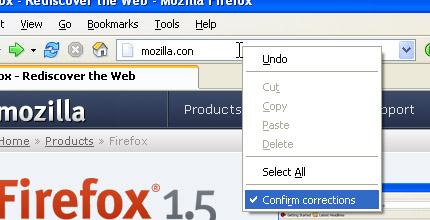
URL Fixer corrects typos in URLs that you enter in the address bar. For example, if you type google.con, it will correct it to google.com (asking first, if you enable confirmation).
It will correct common misspellings of .com, .net, .org, .edu, .gov, .mil, and all other mainstream TLDs, as well as the protocol (http:, https:).
Install URL Fixer
3. Adsense Notifier
Adsense Notifier displays your Adsense earnings on your Firefox status bar. It allows you to easily see your earnings at a glance instead of logging into the Adsense website multiple times a day.
Install Adsense Notifier
4. ForecastFox
Forecastfox is an extension that brings international weather to your Firefox web browser. You can use your US zip code or you can easily find your town or city by using the built in search tool. It is unobtrusive and lightweight, yet can be customized to display nearly as much data as the leading desktop weather programs.
Install Forecastfox
5. Paste and Go 3
Paste and Go 3 is a Firefox extension that gives you similar functionality in Firefox. It will save you time every day, just copy the link and paste and go immediately.
Install Paste and Go 3
6. AutoCopy
Do you like the content area context menu item? Autocopy is the time saving way of cutting and pasting text from within Firefox, Mozilla, or Thunderbird. Then try the Autocopy Context Menu. Select some text and up pop ups the Autocopy Context Menu.
Install AutoCopy
7. ColorZilla
With ColorZilla you can get the color without having to guess or play around with an image editor to try to match the color, quickly adjust this color and paste it into another program. You can Zoom the page you are viewing and measure distances between any two points on the page. This is a good add-on if you are trying to build your own website and trying to blend the colors together.
Install ColorZilla
8. Clear Cache Button
Adds a clear cache toolbar button. After installing the extension, find the clear cache button in the toolbar customization panel.
Install Clear Cache Button
9. FEBE
FEBE allows you to quickly and easily backup your Firefox extensions. In fact, it goes beyondFEBE license plate just backing up -- It will actually rebuild your extensions individually into installable .xpi files. Now you can easily synchronize your office and home browsers. FEBE backs up and restores your extensions, themes, and (optionally) your bookmarks, preferences, cookies.
Install FEBE
10. TinyUrl Creator
Easy shrink any long URL or link in the page to something you can email or Twitter using the TinyUrl service with a single click in your browser.
Install TinyUrl Creator
11. Clipboard-Save-As
This extension is useful when you have an URL in your clipboard pointing to a file (for example, a movie clip) you want to save to your hard drive. Many times, just pasting the URL in the address bar will lead to Firefox opening it instead of giving you the option to save it. With Clipboard-Save-As, an option is added to the Tools menu that allows you to save the file to your hard drive. Just make sure the URL to the file is in your clipboard and then select Save File from Clipboard.
Install Clipboard-Save-As
12. SwitchProxy Tool
SwitchProxy lets you manage and switch between multiple proxy configurations quickly and easily. You can also use it as an anonymizer to protect your computer from prying eyes.
Install SwitchProxy Tool
Subscribe to The-Online-Quest for even more Cool Firefox Add-ons list.


10.19.2008
Cool Web Services, Apps, Tips and Tricks (Episode #1)
All listed websites below that i found are FREE(no buys no trials, only some need to register and create your own account to use their services). Check out some of the Cool Web Services, Apps and Tricks and latest discoveries done by me. Subscribe to The-Online-Quest for even more Cool Web Services, Apps and Tricks list.
1. Change Calender Icon In Blogger - This trick tutorial will explain "how to change posting date to a calender icon".
2. Gickr - Use Flickr images and Youtube videos to create Animated GIF online. Read More: Create Animated Gif Images Online
3. OnlinePhotoTool - Edit and save your images, screenshots and photos online. Read More: Free Online Image & Photo Editor
4. PDFMeNot.com - An online PDF to Flash converter that will instantly convert any Adobe PDF document into a Macromedia Flash (SWF). Read More: Convert PDF Documents to SWF Online
5. Splashup - Powerful editing tool and photo manager. With all the features professionals use and novices want. Read More: Online Photoshop Alternative with Splashup
6. Surf Anonymous - Learn how to setup your own proxy and surf safely, learn to know what is a proxy server. Read More: Surf Anonymous Online With Free Proxy
7. SendSMSnow.com - Send free sms, organize your phonebook, organize your groups, receive replies. Read More: Send SMS Via The Web For Free
8. Zamzar - Allows you to transform your songs, videos, images and documents into a variety of different formats. Read More: Convert any file formats online
9. BitLet.Org - Download torrent files without using torrent client. Read More: Download Torrent Files Without Using Torrent Client
10. Smushit.com Optimize the size of web images without affecting visual quality. Read More: Shrink your Image Size Online with Smush it


